
What's New in Fresh (0.4.0)
A dozen point releases since 0.3.0, and the through-line is working across many workspaces and machines from one Fresh daemon: a multi-window Orchestrator with a persistent dock, remote workspaces you start from the UI, and a universal search that spans files, buffers, and terminals. Plus a reimagined review diff, live diff, terminal path links, and the usual long tail of editor, LSP, and language work.
A note on vocabulary (new in 0.4.1). Fresh has sharpened the overloaded word session. A workspace is the editor's per-project unit — what the Orchestrator lists, opens, and manages. A daemon is the persistent background process you attach to and detach from. A backend is where a workspace runs: local, SSH, dev container, or Kubernetes. The screenshots below use the new names; the CLI still accepts the now-deprecated
--cmd sessionas an alias for--cmd daemon.
Wave Screensaver
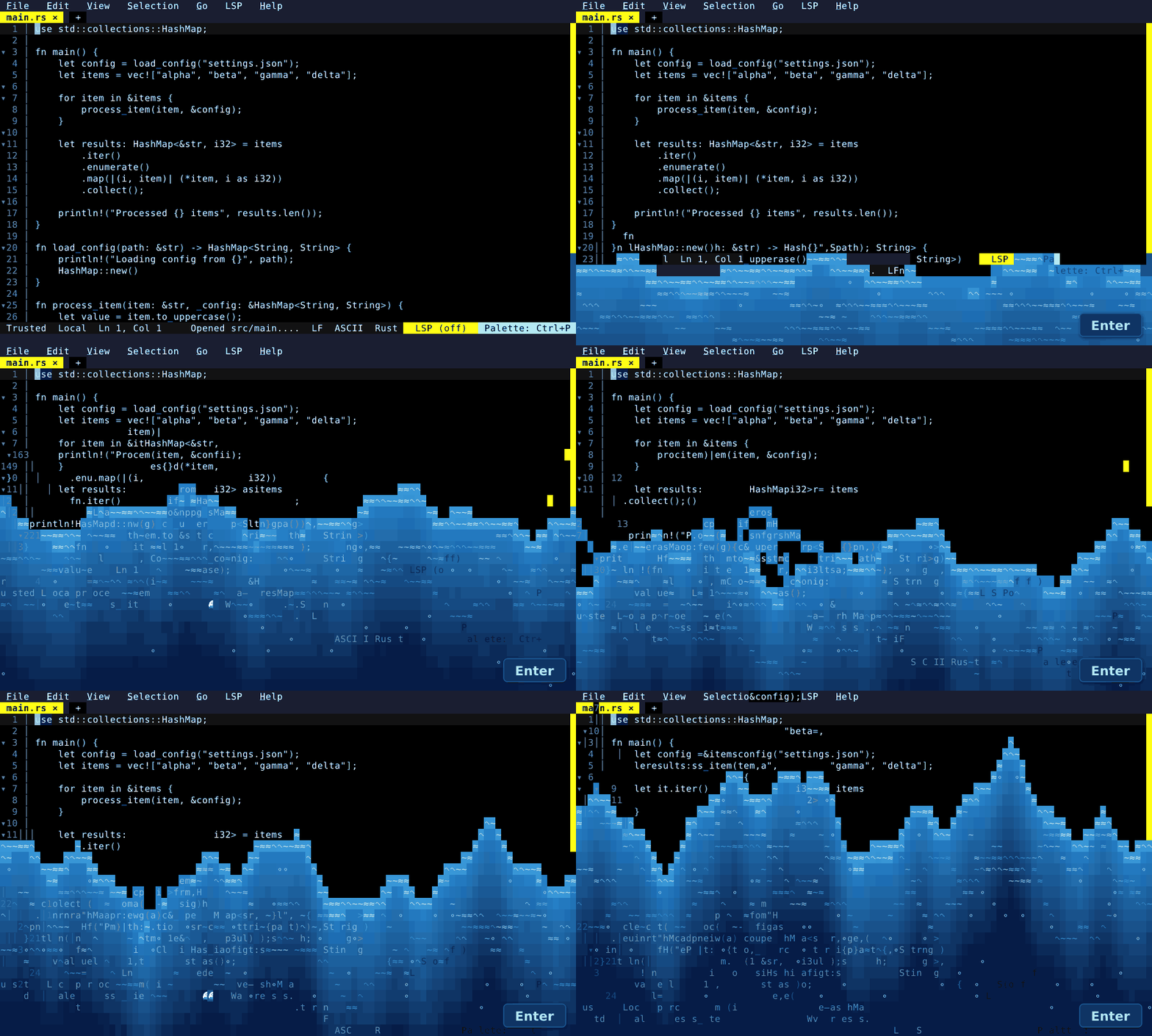
Pure eye-candy: a decorative wave washes over the editor — a rising sea of glyphs that bounces every cell (text, gutter, chrome) up, down, and sideways, with words launching off the crest and sinking back, before the UI settles intact. Turn it on in the Settings UI (it's off by default): enable the screensaver and it kicks in after screensaver_idle_minutes of inactivity. Or fire it any time — no setup needed — with the Wave Animation command.
The Orchestrator & Dock
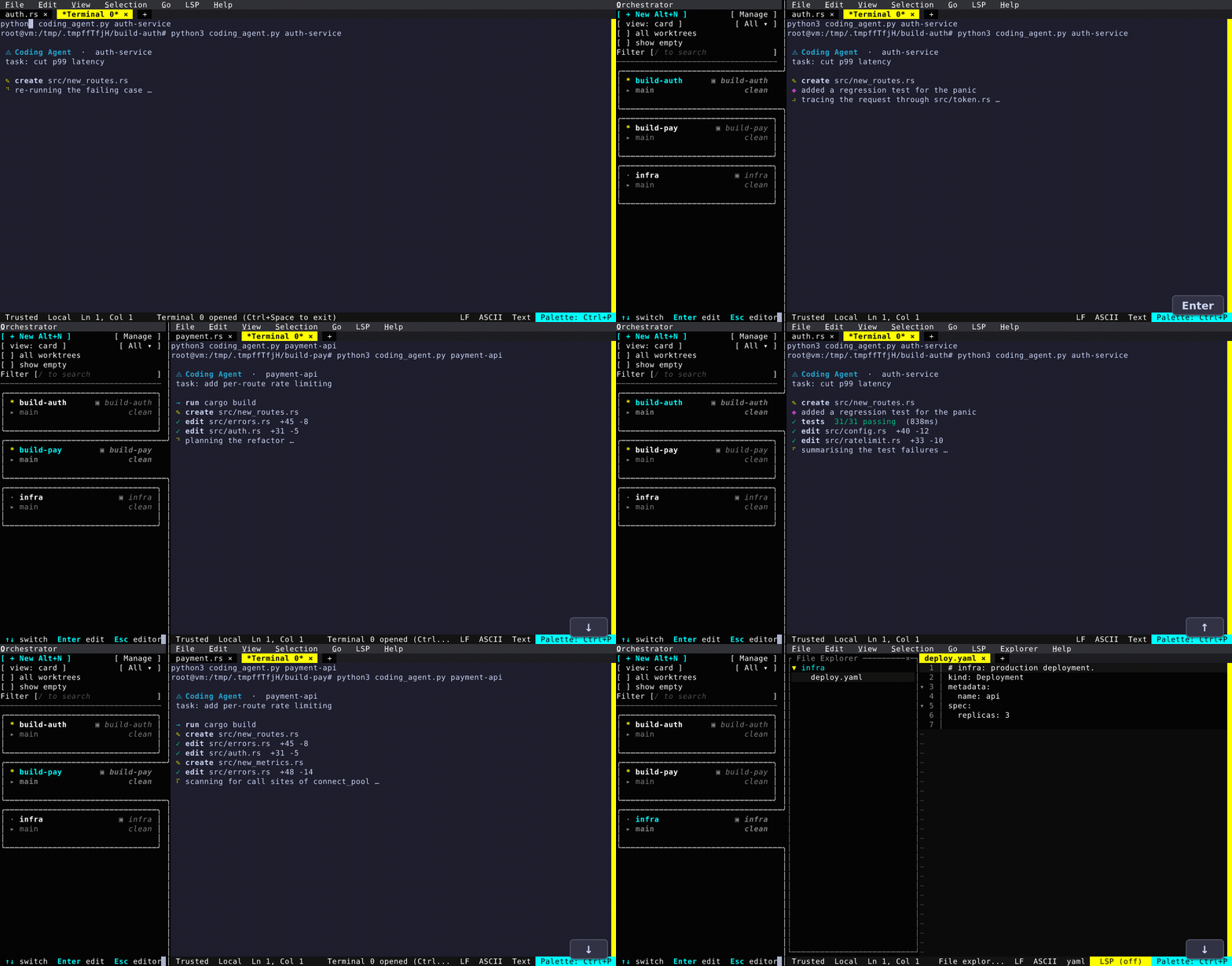
Fresh can now juggle several independent workspaces in one daemon. The Orchestrator Dock is a persistent, non-modal left column that lists every workspace — each row showing working/idle status, project, branch, a git summary, and a PR badge. Alt+O toggles focus to the dock; the arrow keys live-switch the active workspace as you move; right-click a row for Visit / Archive / Delete. Spin up new workspaces from the New Workspace dialog (a backend selector for Local / SSH / Kubernetes / Devcontainer), attach to existing git worktrees, or run bulk actions across a multi-select.
Every workspace keeps running on its own — in the demo below, two of them each run a (fake) coding agent in a terminal while a third holds a file explorer open. Bounce between the two agents and each has kept working: new log lines have streamed in and the spinner is still turning, captured mid-stride.
Agent Workspaces
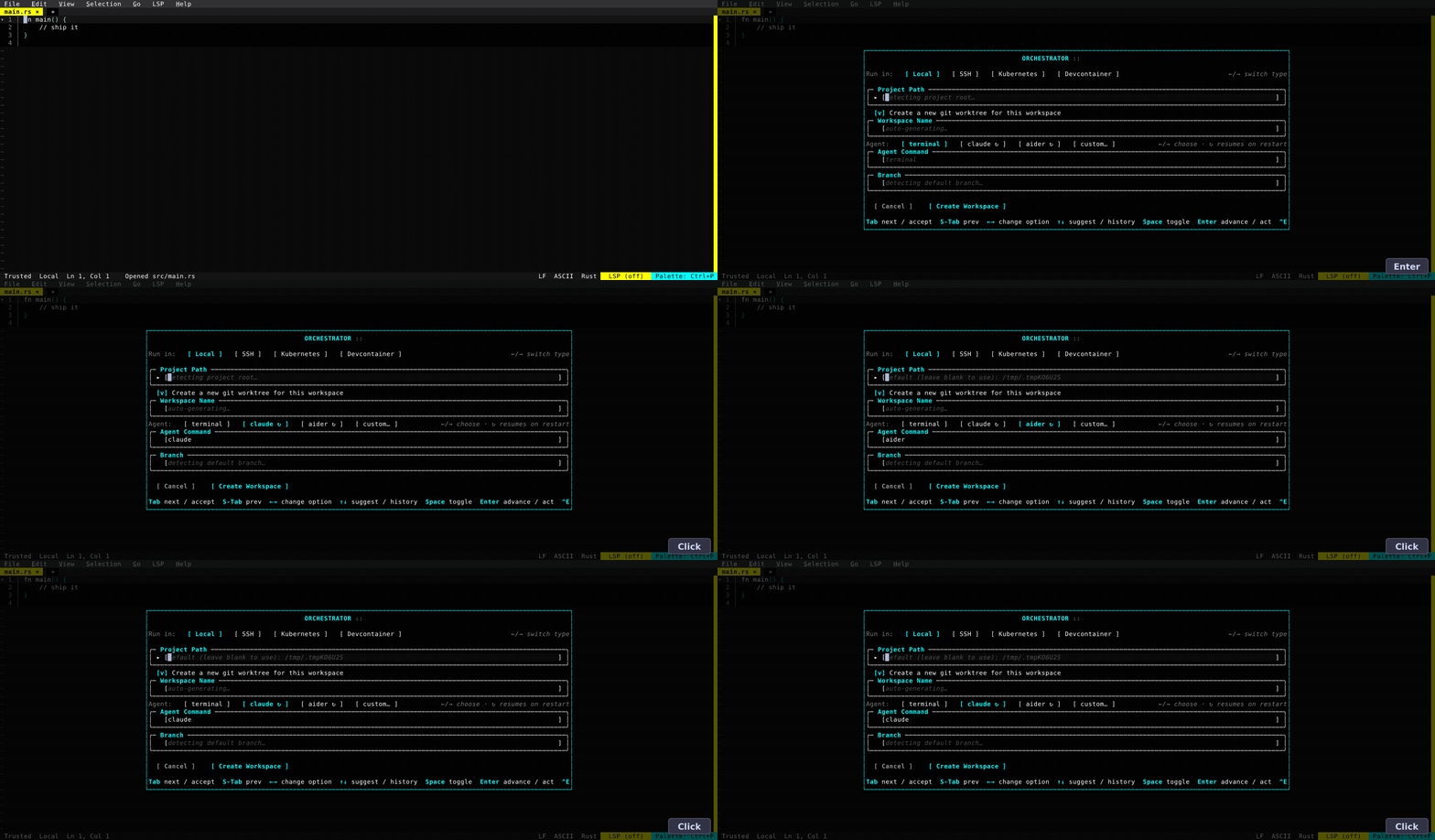
The New Workspace dialog now knows about coding agents. An Agent: dropdown offers the plain terminal plus known agents (claude, aider); the ones tagged ↻ resume on restart — Fresh provisions a session id when it launches the agent, so reopening the workspace rejoins the running conversation instead of relaunching it. Pick one and it fills in the Agent Command for you.
Remote Workspaces from the UI
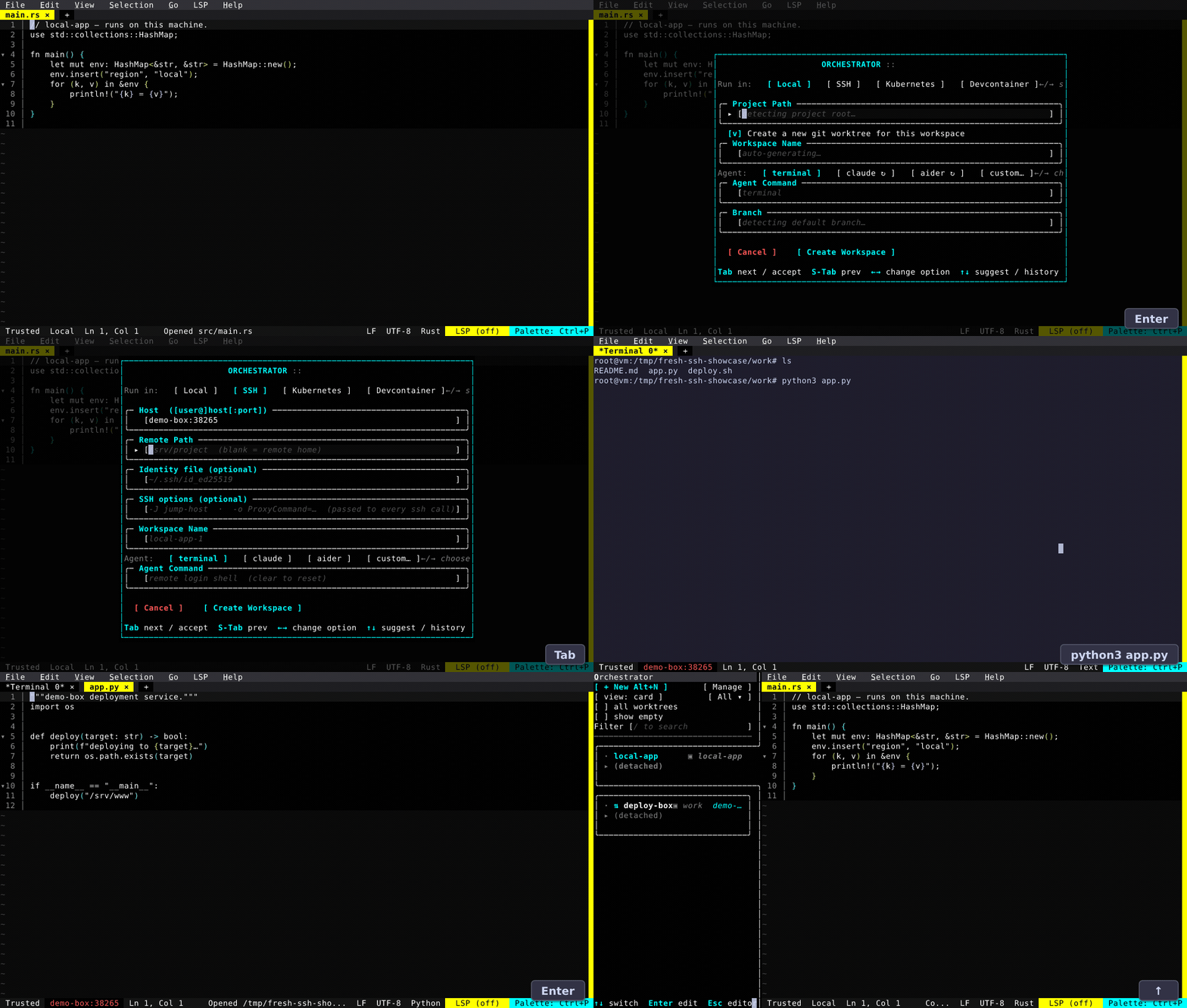
You could already launch a remote host from the CLI; now the New Workspace dialog attaches one for you. Pick the SSH backend, point it at a host — host, user@host:port, or ssh://…, with an optional identity file and extra ssh options — and Fresh brings up a full remote workspace: the filesystem, LSP, process spawners, and an integrated terminal all run on the remote host. Switching workspaces retargets without a restart. An initial, experimental Kubernetes backend connects over kubectl exec with a keepalive heartbeat and reconnect. Each workspace owns its own backend, trust level, and environment, and remote workspaces reconnect when you activate them again.
Universal Search
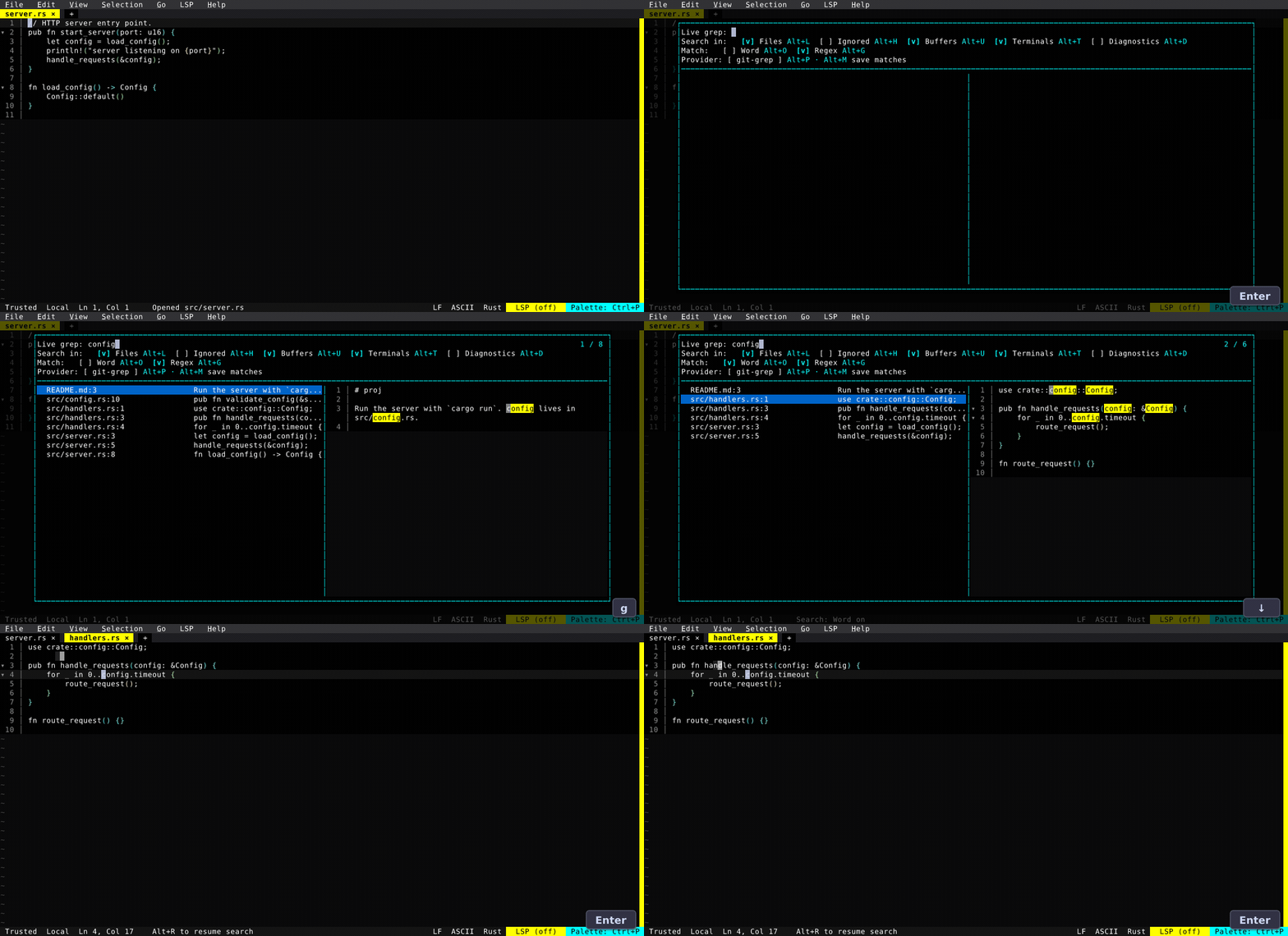
Live Grep grew into a universal search overlay: search across multiple scopes — project files, open Buffers, and Terminal scrollback — in Word or Regex mode, with a clickable toolbar and a live, syntax-highlighted preview on the right. Resume reopens the last query with cached results, and Export to Quickfix drops the hits into a dockable list you can navigate with Enter.
Review Diff, Reimagined
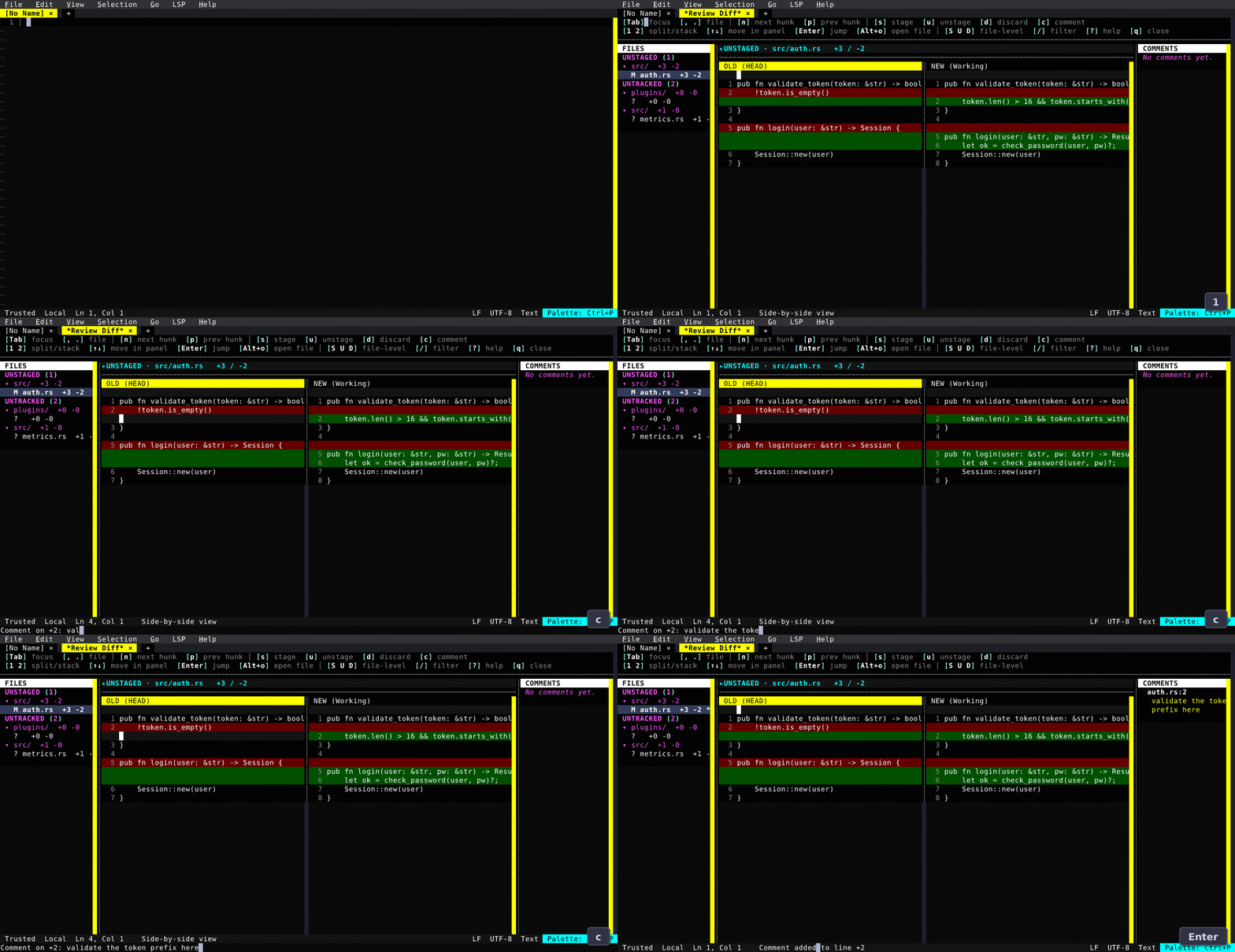
The review diff picked up a real review workflow: a file sidebar grouped by directory with status, line counts, and comment badges; a true side-by-side view with Tab between the OLD/HEAD and NEW/working panes (and Enter to open either version at that line); comments anywhere, including multi-line notes rendered as inline callouts and collected in a dedicated panel; Review Stash to review a git stash as a diff; and a watch mode that auto-reloads on save. A / filter and split/stack/auto layout toggles round it out.
Live Diff
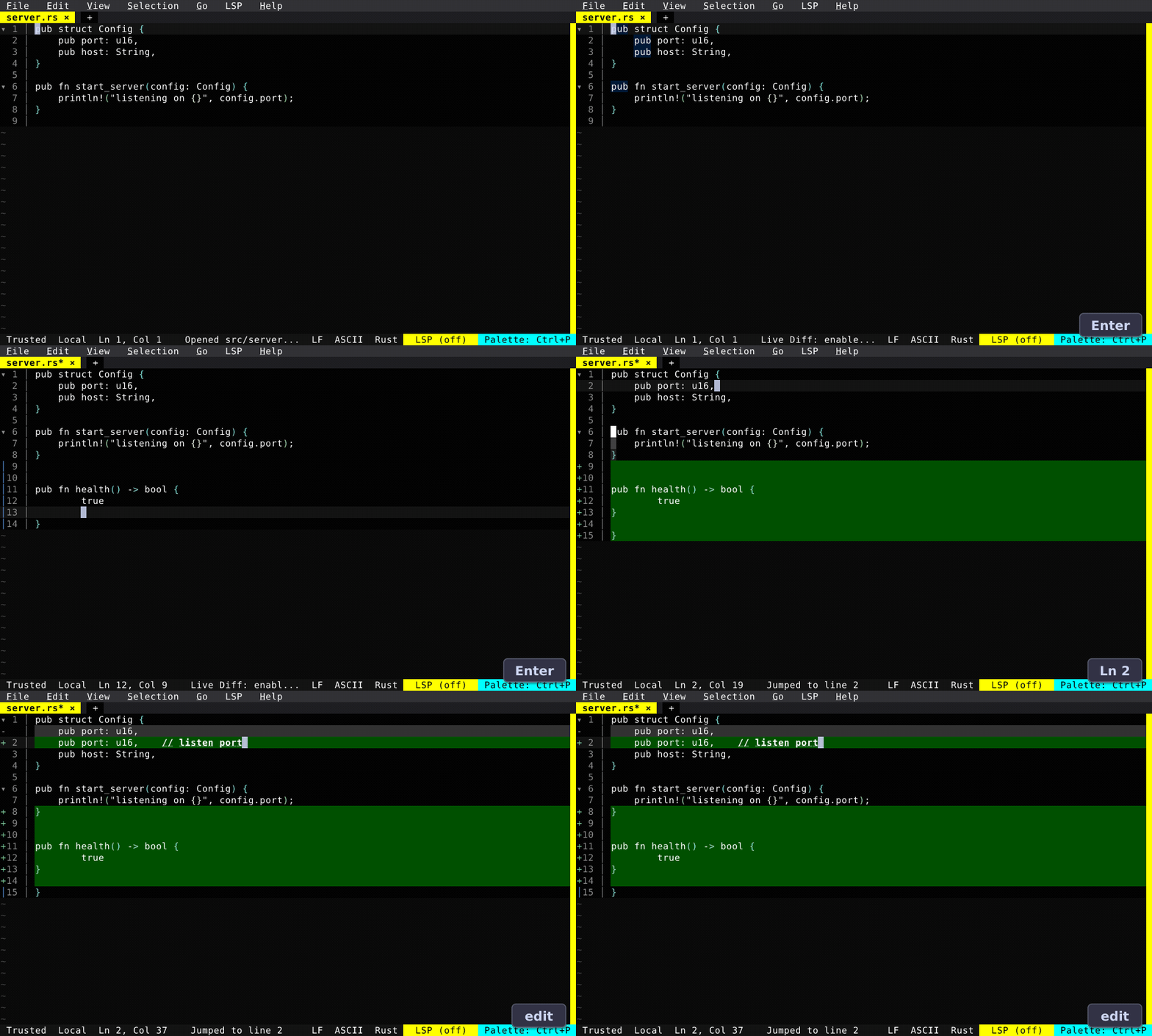
The Live Diff plugin overlays a unified diff inside the editable buffer and keeps it current as the file changes — pick a reference (vs HEAD, vs Disk, vs Branch…) and watch edits land in real time. Added lines get a + gutter and a green background; an edited line shows its old text above with a - gutter, with word-level highlighting inside changed line pairs. Especially handy for watching an agent rewrite a file under you.
Terminal Path Links
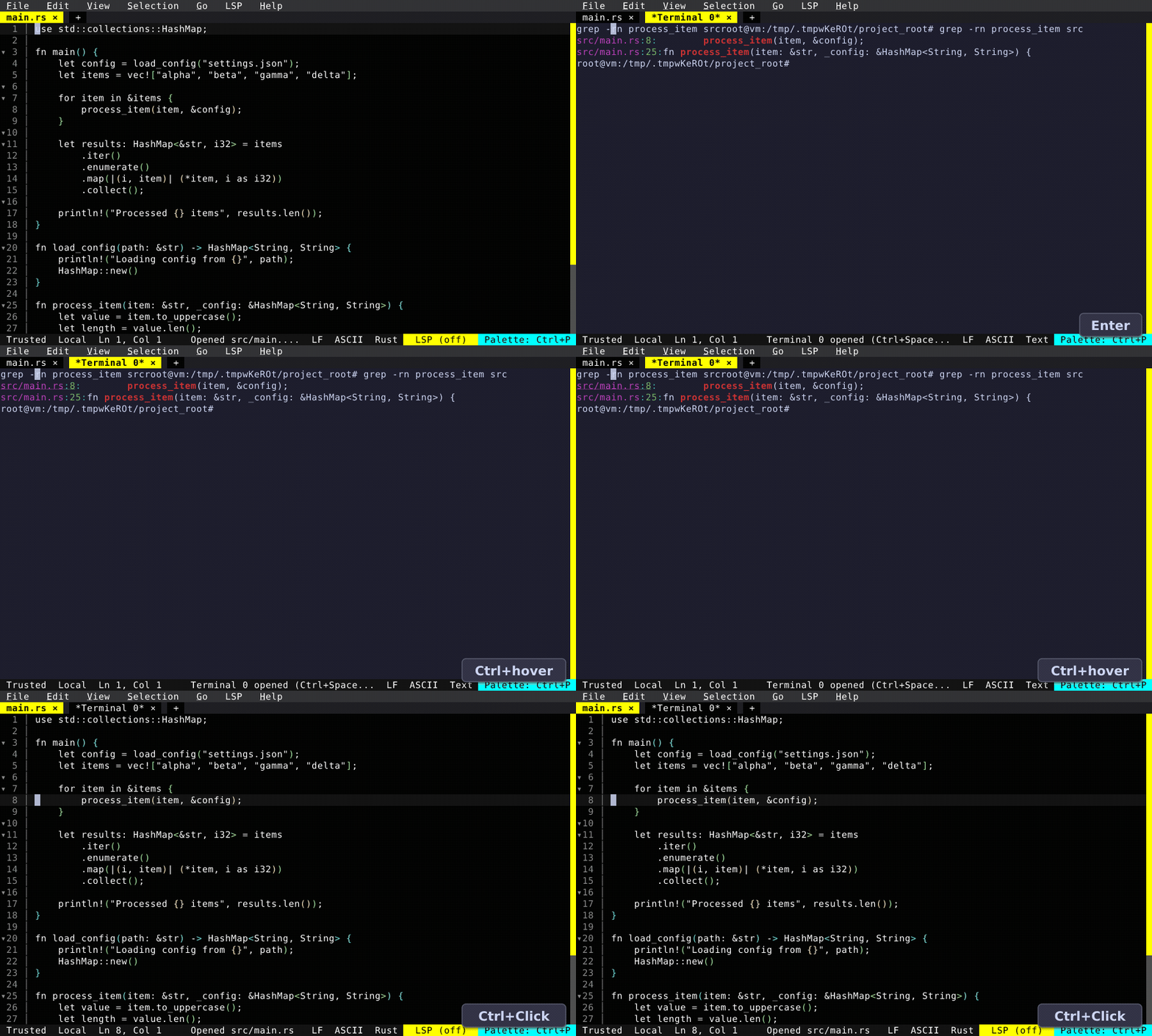
Run a build, a test, or a grep in the integrated terminal and Ctrl+Click (or Ctrl+hover) any path:line in the output — including in scrollback — to jump straight to that file and line. Fresh also tracks the shell's working directory via OSC 7 so relative paths resolve correctly. Going the other way, send the selection (or current line) to the terminal to run a snippet REPL-style without leaving the editor.
Workspace Trust & Environments
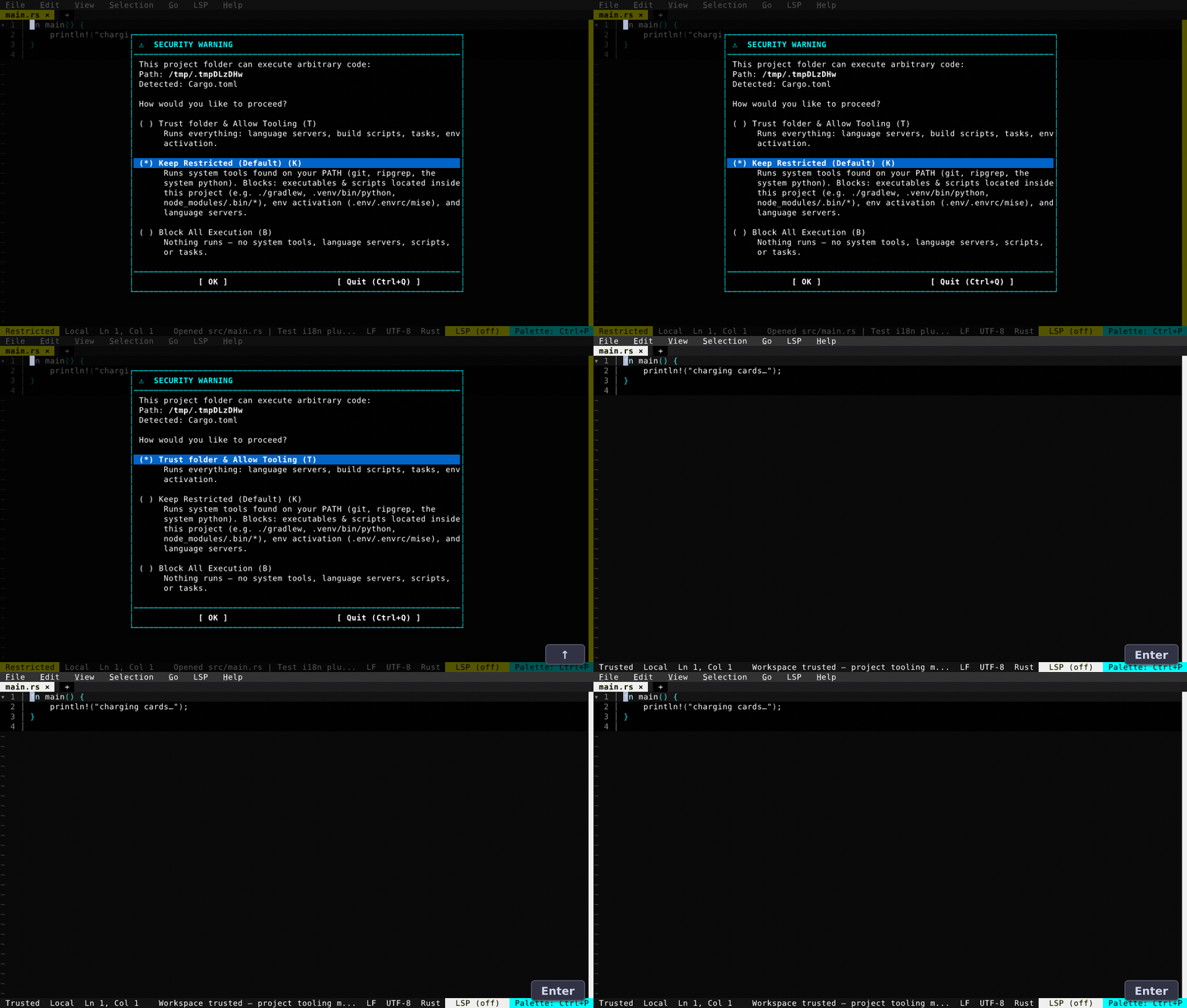
Open a folder that can run code — a project manifest (Cargo.toml, package.json, pyproject.toml…), a build script, or a shell environment (.envrc, mise, .tool-versions) — and Fresh raises a full-screen security prompt that names exactly which markers it found and offers three choices: Trust folder & Allow Tooling (run language servers, build scripts, tasks, and env activation), Keep Restricted (run the system tools on your PATH but block the project's own scripts, env activation, and language servers), or Block All Execution. Trust is per-workspace, surfaced by a clickable {trust} element that now leads the status bar.
0.4.1 made it one prompt for everything. A folder with a shell environment no longer pops a second dialog from the env-manager plugin — the single trust prompt names the detected environment and activates it on trust. And once trusted, that environment now applies uniformly across every backend — the integrated terminal, Docker, Kubernetes, and SSH — so language servers, formatters, the tools Fresh spawns, and your terminal all see the same python, node, and env vars. Detection lives in core and is user-extensible (env.detectors, now also covering pipenv and poetry); a lone .venv no longer silently auto-trusts; and changing the trust level refreshes only the active workspace — other windows keep their running terminals, language servers, and dock — instead of restarting the whole editor.
Go to LSP Symbol
A symbol finder with live preview: filter your document's symbols, see source-line snippets, and jump precisely to the symbol name (line and column), with the symbol under the cursor preselected.
Also New
Editing & Navigation
- Rainbow bracket colorization for matching brackets across the viewport.
- Occurrence highlighting toggle for the word under the cursor; the current-line highlight now hides while text is selected.
- A Clear Search action (and a plugin API exposing the active search state).
- Distribute clipboard across cursors — VS Code-style column-mode paste when the clipboard line count matches the cursor count.
- Add Cursors to Line Ends, Move to Next / Previous Paragraph, and Go to line with selection.
- User-configurable indentation rules — VS Code-style regex tiers via
[languages.<id>.indent]. - Cancel / Clear Mark actions for fine-grained selection-anchor management.
- Git Log (Current File) command, plus concurrent git-blame buffers.
Terminal
- Tab auto-naming that follows the foreground process and OSC title.
- Scrollback survives resize,
clear, and alternate-screen programs, and soft-wraps long lines. - Nested
freshlaunches ($EDITOR,git commit) open in the parent editor instead of a second one. - A
+new-tab button on the tab bar (New Terminal / New File).
File Explorer
- Compact directories (
com.example.name, VS Code/IntelliJ-style), follow-active-buffer, natural-order filename sort, and context-menu Duplicate / Copy (Relative) Path. - A plugin slot-override API — plugins can set per-entry icons, status, and name color.
Settings & Themes
- Settings UI overhaul: tree-view categories, direct number typing, inline list editing,
Ctrl+Rto reset a field to its default, and distinct, keyboard-reachable[Inherit]/[Reset]/[Clear]per field. - New options:
lsp_enabled(disable all LSP globally),auto_read_only(turn off automatic read-only mode for foreign files), and a configurable status-bar separator with its own theme keys. - Theme inheritance with
extends: "builtin://dark", plus a newterminaltheme that uses your terminal's own palette. - Animations framework — tab-switch slide, a cursor-jump trail, and a color-transition on theme switch (toggleable).
- Press
qto close the Keyboard Shortcuts and Fresh Manual viewers.
Platform & Plugins
- LSP over SSH runs the language server on the remote host.
- Windows on ARM release artifacts.
- The Orchestrator is fully internationalized — all 225 user-facing strings across the 14 supported locales.
- Status-bar element registration API (
git_statusbar),tab_actions, plugin-registered config items, overlay toolbar widgets, andeditor.httpFetch. - A minimal static musl Linux binary, and an ~18 MB smaller default binary from trimming bundled grammars.
New Languages
C3, Templ, HDL (Verilog / SystemVerilog / VHDL), Racket, and GDScript — plus, in 0.4.1, Assembly (GAS and NASM/Intel across x86 / ARM / RISC-V via asm-lsp), Fish, and Smali. yarn.lock and other well-known lock/config files now highlight by their real format.