
What's New in Fresh (0.3.0)
April 21, 2026
A roundup of everything that landed since the 0.2.18 release — eight point releases spanning a startup script, a TUI dashboard, devcontainer attach, a rewritten review diff and git log, preview tabs, customizable status bar, and a long tail of editor and LSP refinements.
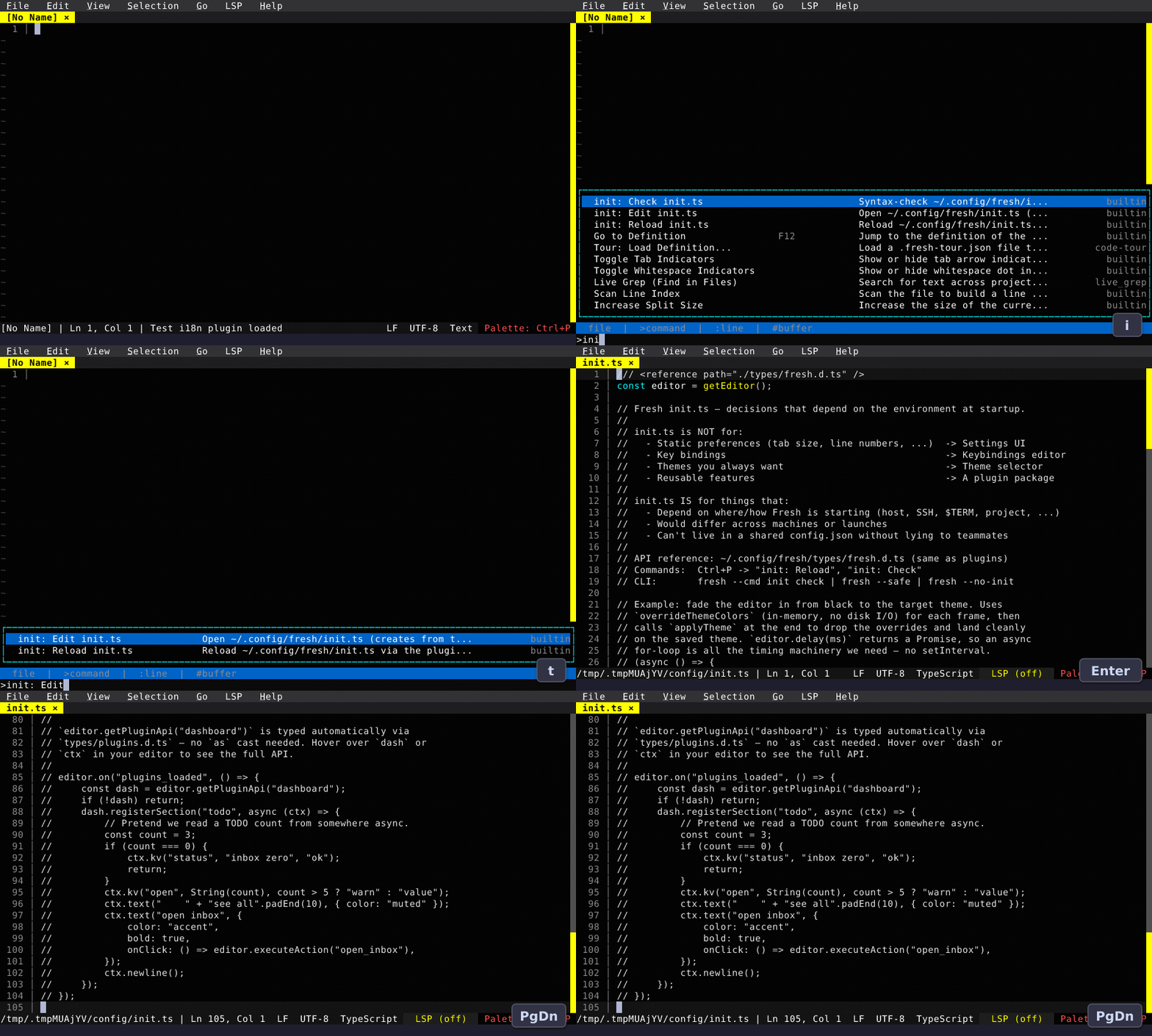
init.ts — a Startup Script
Fresh now auto-loads ~/.config/fresh/init.ts on startup. Run init: Edit from the command palette to open it with a starter template, then init: Reload to re-run without restarting. It's TypeScript with the full plugin API, and it complements the declarative config — things like "calmer UI over SSH" or "use this rust-analyzer path on my work laptop" live here because they depend on where Fresh is starting, not on the shared config.
See the Startup Script guide for the full picture.
Dashboard
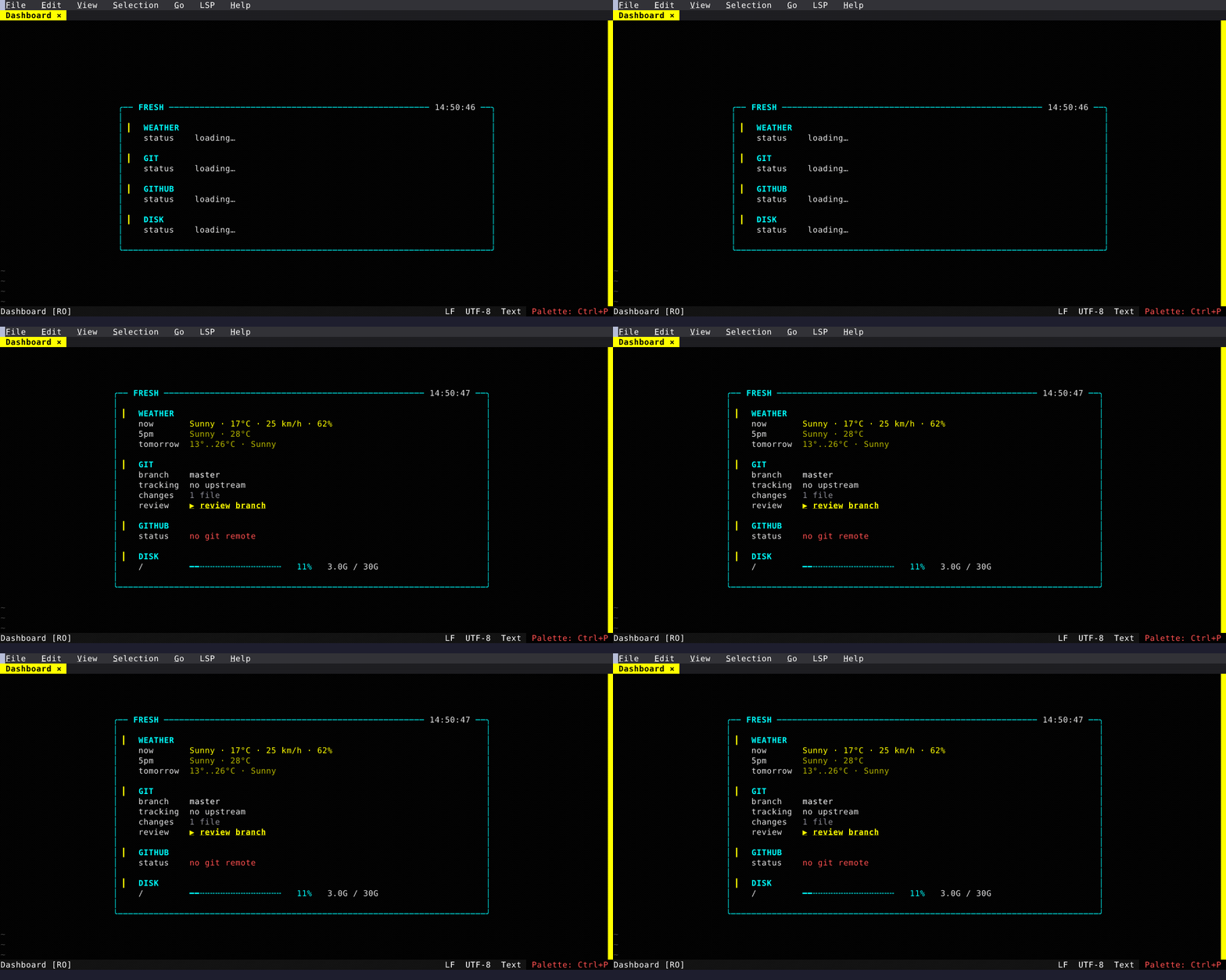
A built-in TUI dashboard replaces the default [No Name] buffer with git status + repo URL, a "vs master" commits-ahead/behind row, and disk usage for common mounts. Optional weather and GitHub-PR widgets ship in the box and can be wired up from init.ts since they hit the network. Enable the plugin via plugins.dashboard.enabled in config.json or the Settings UI. Third-party plugins and your init.ts can contribute custom sections through the registerSection() API — see the Dashboard feature page.
Devcontainers
Projects with .devcontainer/devcontainer.json get Dev Container: Attach and Dev Container: Rebuild in the command palette, plus an attach prompt on launch. While attached, the embedded terminal, filesystem, and any process Fresh spawns all run inside the container. Requires the devcontainer CLI. See Devcontainers.
Review Diff Rewrite
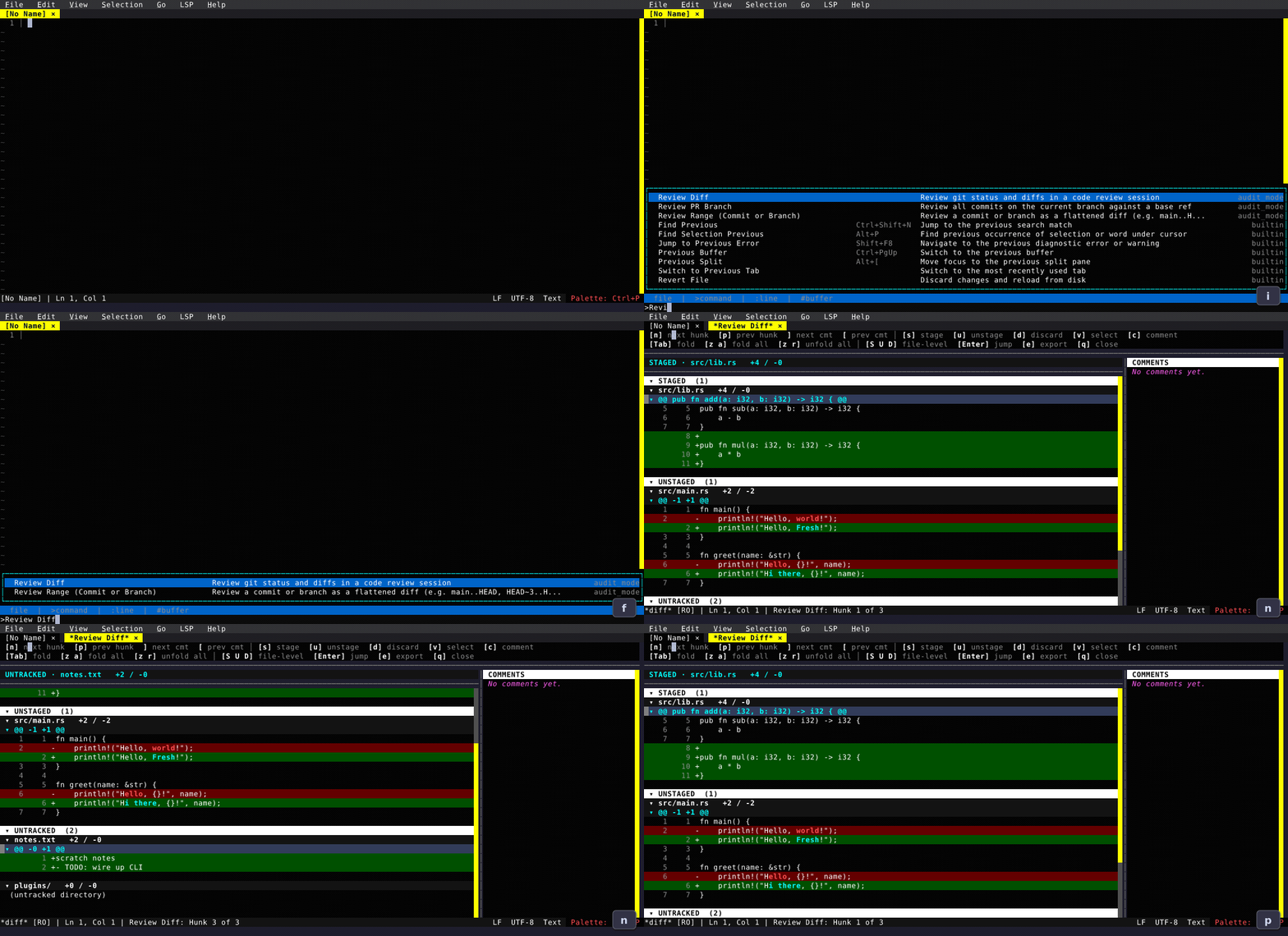
The review diff view is now a single unified buffer: file list at the top, hunks below, all scrollable together. Use n / p to jump between hunks. Stage, unstage, or discard on the cursor row — hunk, whole file, or a line-level visual selection. Review comments now persist per repository across sessions, and a dedicated Comments panel makes them navigable. New entry points: Review: Commit Range for any range expression and Review: PR Branch for walking a branch's commits with a live side-by-side view.
Git Log
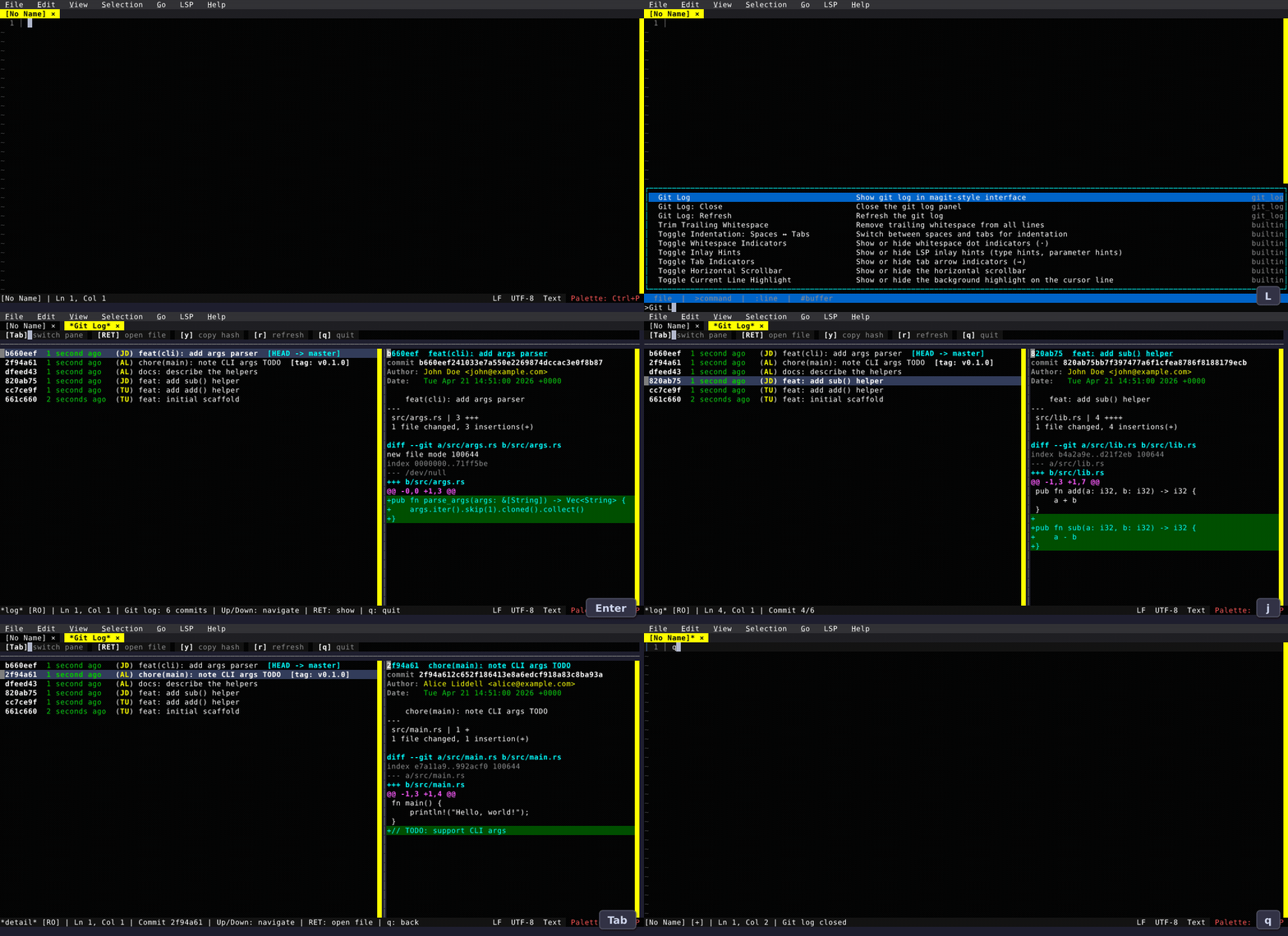
Git Log opens a live-preview view — moving through the log updates the right panel with the selected commit's diff. Columns are aligned, messages wrap, and the toolbar is clickable.
Preview Tabs in File Explorer
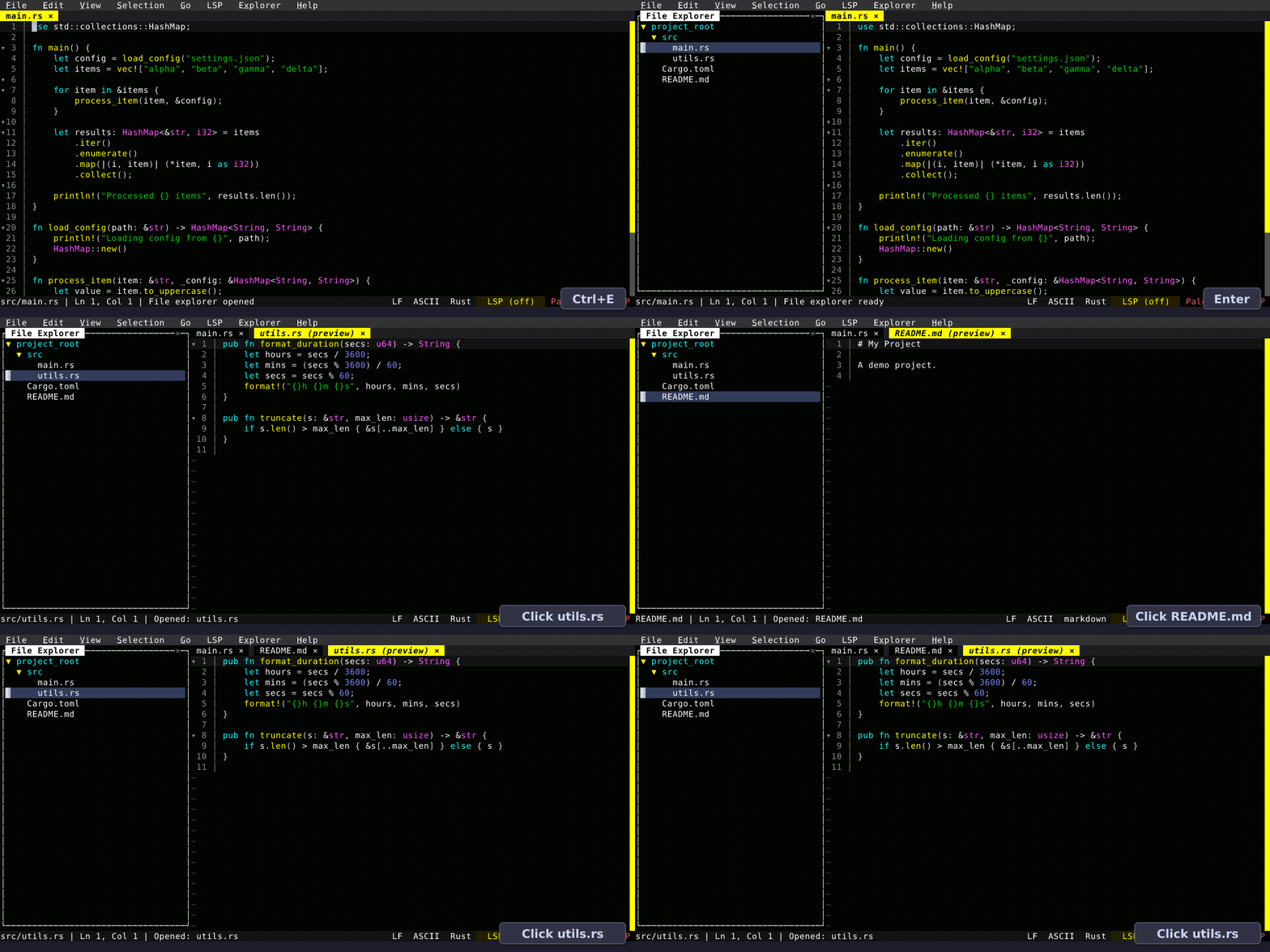
Single-clicking a file in the explorer now opens it in an ephemeral preview tab. The next single-click replaces that preview instead of accumulating tabs. Any real commitment — editing, double-clicking, pressing Enter, clicking the tab, or a layout action — promotes it to a permanent tab. On by default; turn off in the Settings UI if you prefer the old behavior.
Customizable Status Bar
The left and right sides of the status bar are now configurable through the Settings UI. Items move between Available and Included columns using a DualList picker, and the arrow buttons let you reorder. A new {clock} element shows HH:MM with a blinking colon.
Also New
Editing
- Buffer-word completions without an LSP — words from your open buffers appear in the completion popup below any LSP results. Works everywhere, including in plain text and languages without a configured server.
- LSP code actions now fully work — quick fixes, refactors, rename/create/delete-file workspace edits, all merged into a single popup when multiple servers are configured.
- PageUp/PageDown is view-row-aware in wrapped buffers with a 3-row overlap between pages.
- Find Next now centers off-screen matches vertically so you keep context above and below.
Themes and UI
themeinconfig.jsonaccepts relative paths ("my-theme.json"),file://with${HOME}/${XDG_CONFIG_HOME}expansion, and URL-packaged themes (https://.../#theme) — convenient for sharing config via dotfiles. See Themes.- Adaptive line-number gutter sized to the actual buffer.
- Markdown tables render with full box borders in Page View.
LSP
- Single
LSPstatus-bar indicator that opens a popup with per-server status, progress, restart/stop/log actions, and a "binary not in PATH" label so missing servers don't silently keep failing. - Multiple servers per language with
only_features/except_featuresfilters, merged completions, per-server diagnostics. root_markersfor per-language workspace root detection.- Hover fuses any overlapping diagnostic (severity-coloured, source-tagged) above the hover body.
.hfiles route to C++ when there's a clear signal (sibling.cpp/.hpp/.hxx).
Configuration
default_language— set a fallback language config for unrecognized file types ({ "default_language": "bash" }).- Grammar short-name aliases — use
"bash"instead of"Bourne Again Shell (bash)"in language configs. - Per-language
line_wrap,wrap_column,page_view, andpage_width— wrap Markdown at 80 while leaving code unwrapped. - New settings:
show_tilde,menu_bar_mnemonics. Create-dirs-on-save. Customizable status bar.
Remote
fresh ssh://user@host:port/pathon the CLI — the URL form now works as a launch argument, not just inside the editor.- Background auto-reconnect with a disconnected indicator; filesystem calls no longer block the event loop; file finder (
Ctrl+P) works on remote filesystems. - File explorer in remote mode starts at the provided remote path instead of
~.
Plugin API
editor.overrideThemeColors(...)for in-memory theme mutation.editor.parseJsonc(...)for host-side JSONC parsing.editor.setAuthority/clearAuthority/spawnHostProcess— the same Authority abstraction that powers SSH and devcontainers, exposed to plugins.- Plugin-created terminals now follow the lifetime of the action that spawned them.
mouse_clickhook payload carries buffer coordinates; virtual lines accept theme keys and follow theme changes live.
Quality of Life
- Redraw Screen palette command to repaint when something outside Fresh scribbles over the TUI.
- Terminal window title tracks the active buffer's filename.
- Read-only state persists across sessions.
- Narrow-terminal status bar drops low-priority elements in order so filename and cursor stay visible.
- Settings UI: deep search walks into Map entries and nested values; Inherit/Unset support for nullable settings.
- Keybinding Editor: special keys (Esc, Tab, Enter) can now be captured — press Enter on the key field, press the key you want, press Escape to cancel.
- Windows-1251 encoding; detection is heuristic, so reload with encoding if it guesses wrong.