
Fresh 0.2
February 11, 2026
TLDR: Fresh has reached a level of maturity and feature coverage - that I consider significant enough for a minor version bump. Hence, 0.2.
The 0.2 release brings session persistence, a keybinding editor, improved line editing, and a long list of bug fixes.
Session Persistence
Detach from and reattach to editor sessions with fresh -a <name>. Sessions persist across terminal disconnections — use fresh --cmd session list to manage them.
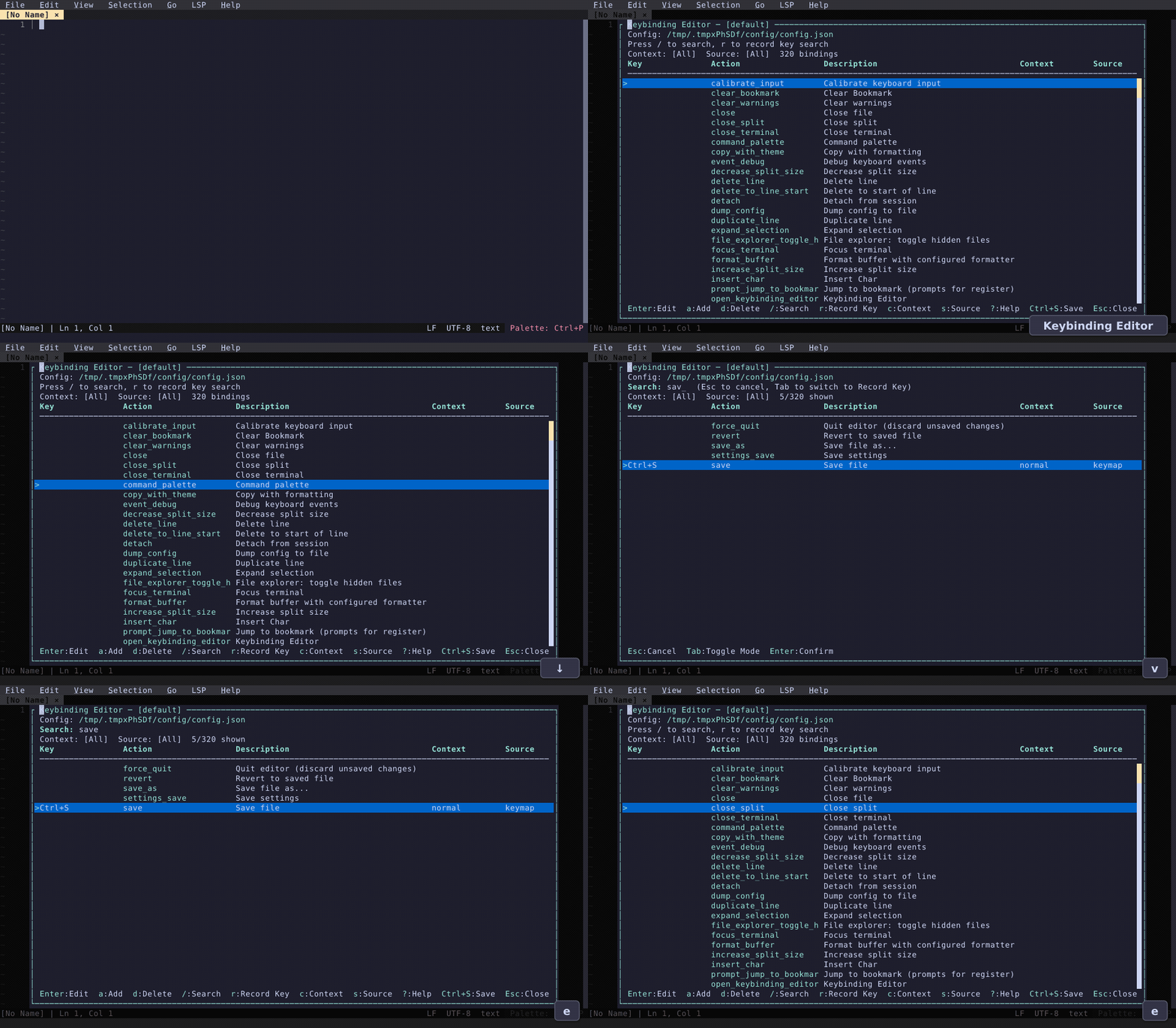
Keybinding Editor
A full-featured editor for customizing keybindings: search by text or record key, filter by context, add/edit/delete bindings with conflict detection.
Also in 0.2
- Line editing - move lines up/down with Alt+Arrow, duplicate lines, and triple-click to select entire lines — all with multi-cursor support.
- Replace with regex - regex mode now works correctly with capture group support (
$1,$2,${name}) - Typst language support — syntax highlighting and tinymist LSP for
.typfiles - Vietnamese localization — full language support
- LSP improvements — per-buffer toggle, default configs for bash/lua/ruby/php/yaml/toml, fixed document sync corruption
- Line wrapping — End/Home navigate by visual line
- Revised in-editor help manual
- Bug fixes — LSP completion popup, diagnostics gutter, syntax highlighting for extensionless files, terminal scrollback, 32-bit ARM builds
Retrospective: 4 months of Fresh
I started working on Fresh four months ago. Initially I focused on the core buffer handling with large file support (it's so annoying that every editor out there kills your RAM if you open a big log file!) but I quickly realized that a modern text editor must include a very long list of features, to be considered useable.
Since the announcement on Hacker News less than 70 days have passed, in which Fresh gained:
- Week 1: Integrated terminal, GPM mouse support (mouse in native linux console), update checker, LSP diagnostics plugin, LSP hover
- Week 2: Submenus, CJK multibyte support, initial settings UI ("Open Settings" command)
- Week 3: Improvements to install flow, settings UI, terminal colors, CRLF, language detection
- Week 4: Indent selection, recycle bin / trash support, shell command on buffer/selection, format buffer, relative line number mode, select cursor style (block/line/underscore/blink), jump to next/prev occurence of current word
- Week 5: Internationalization (i18n), layered config system, tab context menu (right click), drag-to-split, initial side-by-side diff, theme editor, sudo on save when needed, clickable links in popups
- Week 6: LSP semantic highlighting (thanks Asuka Minato!), enable/disable plugins, toggle menu and tab rows, preview for git grep, macOS keys improvements
- Week 7:
- QuickJS + oxc migration (instead of Deno, 1/2 the binary size, 20% reduction in transitive dependencies and better cross platform support)
- Major refactoring to multiple crates for a faster build
- Vi Mode plugin, file explorer status indicators, selection in popups, transparent terminals
- Week 8: SSH remote editing, package system and manager, unified command palette (search + buffers + commands + goto line), whitespace cleanup command, shift+click to select, bracket highlighting, refactoring to extract all fs IOs into a trait
- Week 9: Integrated terminal support for Windows, text encoding support (UTF-16, GBK, etc), better line wrapping cursor movement, quick search in file explorer, package bundles
- Week 10: Client/server attach/detach sessions, keybinding editor UI, line editing improvements
This is by far the fastest pace I've ever experienced as a software developer, and it's mostly made possible by Claude Code (plus many sleepless nights and marathonic coding sessions). There are still many things to improve, stabilize and polish - and a handful of features I'd like to add, like integrated debugging. I expect the pace to slow down as bug discovery takes time and there's no easy way to accelerate the process.
Keep it Fresh.